Trial and full version
Everything in the Tray Transpose Tool works for 15 days. To keep using it after that, the full version is a one-time purchase of $9.95, for two computers.
| Feature | Trial, days 1–15 | After the trial | Full version |
|---|---|---|---|
| Opening songs from the clipboard, guessing the key | Yes | Yes | Yes |
| Every chord transposed correctly | Yes | No: some chords are deliberately changed | Yes |
| Copying songs back to your programs | Yes | No: copying is turned off | Yes |
| Chord styles, typo checks, highlighting, playing chords | Yes | Yes | Yes |
The 15-day trial
The trial counts calendar days from the first day you run the Tray Transpose Tool, whether you use it every day or not, so a church musician who prepares on Saturdays gets two weekends to try it. The status line at the bottom of the window shows which day of the trial it is.
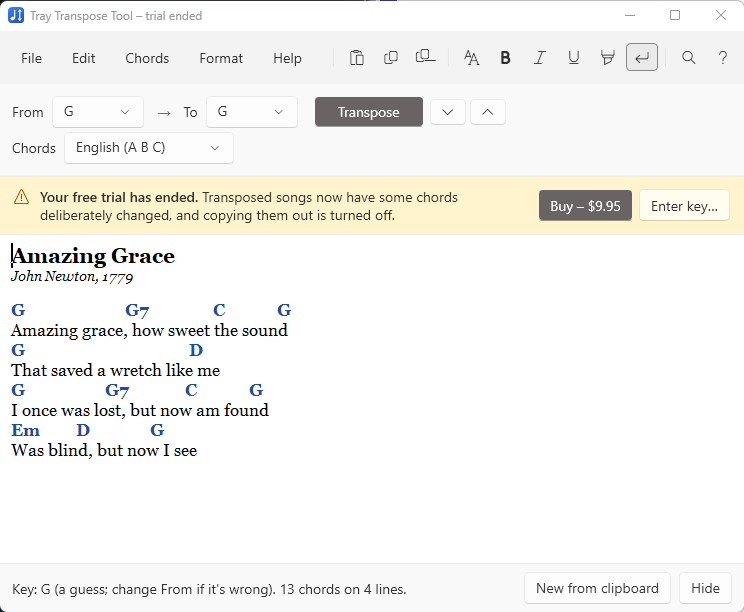
When the trial ends, a yellow bar at the top of the window says so. The Tray Transpose Tool still opens songs and transposes them on screen, but some of the new chords are changed at random, and the transposed song can't be copied out. Buying the full version puts everything back immediately.
Buying the full version
- In the Tray Transpose Tool, choose Buy in the yellow bar, or open Help → Buy or enter a license key and choose Buy the full version. (Or go straight to the Tray Transpose Tool purchase page.)
- Enter the name the license is for (you, or your church or organization; the program shows it as “Licensed to …”) and your email address.
- Pay with PayPal, or with a credit or debit card through PayPal.
- Your license key appears on the page straight away, and is emailed to you. It looks like TTT-7Q2KD-M4XNP-9RV3B-HJ6WT. Keep the email.
Owned Tray Transpose Tool version 2? The full version is $4.99 for you. Enter the 10-letter code you received with version 2 in the Upgrade or discount code box on the purchase page, and choose Apply.
Activating your license
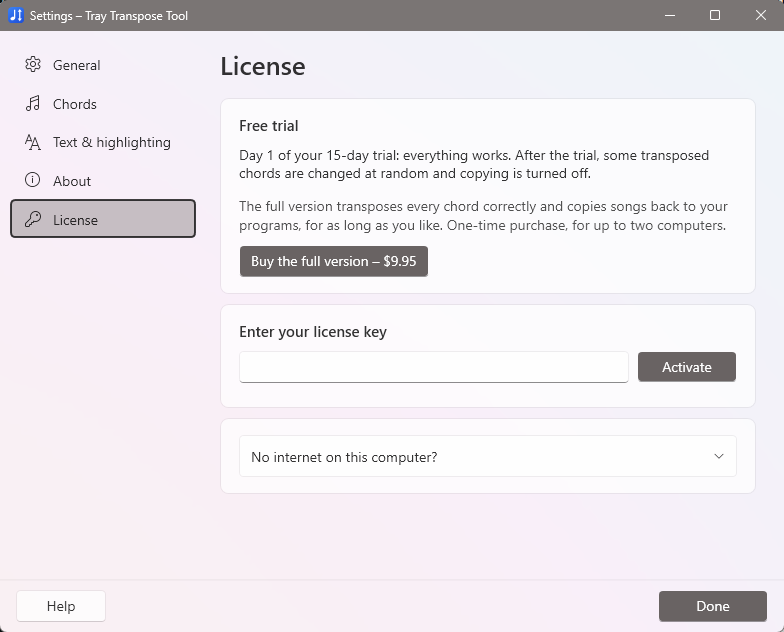
- Open Help → Buy or enter a license key (or Settings → License).
- Paste or type your license key in Enter your license key. Capitals, spaces and dashes don't matter.
- Choose Activate.
The full version starts working immediately; there's no need to restart. Activating needs an internet connection once. After that the Tray Transpose Tool works completely offline. (It checks in quietly about once a month when it happens to be online, but never needs to.)
Using it on two computers
Each license works on two computers at a time, for example at home and at church. Activate the same key on both.
Moving your license to a new computer
- If you still have the old computer: on it, open Settings → License and choose Deactivate this computer. Then activate the key on the new one.
- If the old computer is gone or broken: just try to activate on the new one. The Tray Transpose Tool lists the computers using your license and lets you deactivate one. You can also do this on the manage your license page.
Reinstalling Windows or replacing a part (such as the hard drive) on the same computer usually doesn't count as a new computer.
Activating a computer that has no internet
You can activate a computer that's never online with the help of any other device that is:
- On the offline computer, open Settings → License, expand No internet on this computer?, and choose Copy next to the request code. Save it to a USB stick, or write it down carefully.
- On a device that's online, open the offline activation page. Enter your license key and the request code, and choose Create license.
- Copy the license text it gives you back to the offline computer. Type your license key in the key box, paste the license into the box under No internet on this computer?, and choose Apply.
Lost your license key?
Use the lost key page. Enter the email address you used when you bought, and we'll send your keys there.
Version 2 owners and unlock codes
If you bought Tray Transpose Tool version 2, you can upgrade for $4.99 with the 10-letter code you received; see Buying the full version. Version 2 unlock codes, including the free one published on our web site, don't unlock version 3, which uses a new kind of license key.
Refunds
If the Tray Transpose Tool isn't right for you, email [email protected] for a full refund. The license then stops working, and the program goes back to the end-of-trial behavior.
What's sent when you activate
Only what's needed to check your license: the license key, two scrambled codes that identify the computer (they can't be turned back into anything about it), the computer's name (so you can tell your computers apart when moving the license), and the version number. Your songs are never sent anywhere. Your name and email are used only to send and re-send your license key.