
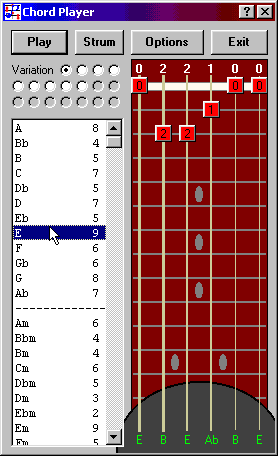
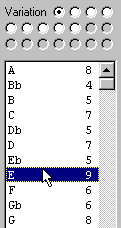
ChordPlayer is a chord library tool for guitar players. Pick from hundreds of chord names and over 2,500 fingerings, then hear them played back through MIDI.
Free to use, with paid support only.
Download ChordPlayer Windows installer, about 3 MB
Features
- Over 2,500 different fingerings and hundreds of distinct chords
- Click-and-drag finger symbols let you try and hear any fingering
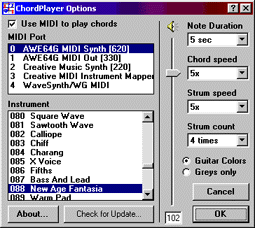
- Real-time playback of chords using the Windows MIDI functions
- Single strum, multiple strum, and note-by-note plucking
- Customizable strum speeds and patterns
- Selectable MIDI port and MIDI patch
- Volume control
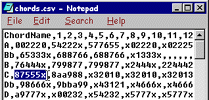
- Customizable chord dictionary
- All options saved between sessions
Download and installation
Download the installer about 3 MB
The program installs as a demo and must be unlocked for full functionality. The unlock information is below.
Unlock information and support
ChordPlayer has been retired and is no longer actively maintained, so it's free to use, and so is the unlock. We recognize it's still valuable to many people. However, support is not free. Support is billed at $20 per half hour, with a $20 minimum and $50 maximum per incident, paid via PayPal.
I understand there is no free support and wish to see the unlock information.
- User name
- No Support Free Unlock
- Key code
- DOIMPSOLCT
Run ChordPlayer, enter the unlock information on the splash screen exactly as shown (including capitalization), and click Unlock.
Free technical tips are collected in our support notes. You can also read the license agreement.
Frequently asked questions
- ChordPlayer was running fine, completely unlocked, and now it's suddenly locked again.
Did you change the network name of your computer? ChordPlayer uses this information to verify the registration information, so you need to unlock it again. This won't happen again unless you change the computer name.
Did you reinstall Windows? The ChordPlayer preferences, saved in the Windows Registry, may have been lost. Simply unlock it again using the information above.
- I have a great new feature to suggest...
- ChordPlayer is no longer actively developed, but we're always glad to hear from you. Let us know.
System requirements
This software was developed for Windows XP and newer. If your system can run any modern version of Microsoft Windows, it can run this program. Run the installer as administrator, and you may need to set compatibility mode for Windows XP. Our support notes explain how.